Lombok is a tool that generates code like getters, setters, constructors, equals, hashCode, toString for us in the same way that our IDE does. While IDE generates all these things in our source code file, Lombok generates them directly in the class file.

So Lombok basically takes out all these things from your source code to bytecode so we don't need to write them in our source code which means less code in our source code file. And in this article, I am going to explain how Lombok can help us in removing this kind of boilerplate code.

To understand it let's suppose we have an entity class Employee and we want to use it to hold a single employee record. We can use it as a DTO or persistent entity or anything else we want but idea is that we want to use it to store id, firstName, lastName and salary fields.

For this requirement, we will need a simple Employee POJO and according to General directions for creating Plain Old Java Object,
  • Each variable in a POJO should be declared as private.
  • Default constructor should be overridden with public accessibility.
  • Each variable should have its Setter-Getter method with public accessibility.
  • POJO should override equals(), hashCode() and toString() methods of Object.
And generally our Employee class will look like

public class Employee {
  private long id;
  private int salary;
  private String firstName;
  private String lastName;

  public Employee() {
  }

  public long getId() {
    return id;
  }
  public void setId(long id) {
    this.id = id;
  }
  public int getSalary() {
    return salary;
  }
  public void setSalary(int salary) {
    this.salary = salary;
  }
  public String getFirstName() {
    return firstName;
  }
  public void setFirstName(String firstName) {
    this.firstName = firstName;
  }
  public String getLastName() {
    return lastName;
  }
  public void setLastName(String lastName) {
    this.lastName = lastName;
  }

  @Override
  public boolean equals(Object o) {
    if (this == o) return true;
    if (o == null || getClass() != o.getClass()) return false;

    Employee employee = (Employee) o;

    if (id != employee.id) return false;
    if (salary != employee.salary) return false;
    if (!firstName.equals(employee.firstName)) return false;
    if (!lastName.equals(employee.lastName)) return false;

    return true;
  }

  @Override
  public int hashCode() {
    int result = (int) (id ^ (id >>> 32));
    result = 31 * result + firstName.hashCode();
    result = 31 * result + lastName.hashCode();
    result = 31 * result + salary;
    return result;
  }

  @Override
  public String toString() {
    return "Employee{" +
           "id=" + id +
           ", firstName='" + firstName + '\'' +
           ", lastName='" + lastName + '\'' +
           ", salary=" + salary +
          '}';
  }
}

But generally, we always use auto-generation strategies of our IDE to generate getters, setters, default constructor, hashCode, equals and toString e.g. alt+insert in IntelliJ.

As you can see the size of Employee class is more than 50 lines where field declaration is contributing only 4 lines. And these things are not directly contributing anything to our business logic but just increasing the size of our code.

Project Lombok provides a way to remove above boilerplate code and simplify development process while still providing these functionalities at the bytecode level. With project Lombok, we can combine all these things within 10 lines

@Data
public class Employee {
  private long id;
  private int salary;
  private String firstName;
  private String lastName;
}

With @Data annotation on top of our class Lombok will process our Java source code and produce a class file which will have getters, setters, default arg constructor, hasCode, equals and toString methods in it. So basically Lombok is doing the trick and instead of us adding all those things in our source code and then compiling it a class file Lombok is automatically adding all these things directly to our class files.

But if we need to write some business code in our getters or setters or in any of above method or we want trick these methods to function a little bit differently, we can still write that method in our class and Lombok will not override it while producing all these stuff in bytecode.

In order to make it works, we need to
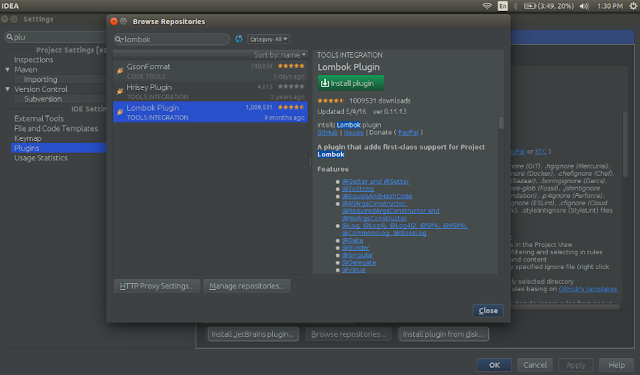
  1. Install Lombok plugin in our IDE e.g. In IntelliJ we can install it from Settings -> Plugins -> Browse Repositories window.installing-lombok-plugin-in-intellij-idea
  2. Enable annotation processing e.g. In IntelliJ we need to check “Enable annotation processing” option on Settings -> Compiler -> Annotation Processors window.enabling-annotation-in-intellij-idea
  3. Include Lombok jar in our build path, we can do it by adding the Lombok dependency in pom.xml file if we are using maven or we will need to download the Lombok jar manually and add it to our classpath.
    <dependency>
      <groupId>org.projectlombok</groupId>
      <artifactId>lombok</artifactId>
      <version>1.16.12</version>
      <optional>true</optional>
    <dependency>
    
Lombok provides a variety of annotations which we can use and manipulate according to our need. Some of these annotations are
  • @NonNull Can be used with fields, methods, parameters, and local variables to check for NullPointerException.
  • @Cleanup Provides automatic resource management and ensures the variable declaration that you annotate will be cleaned up by calling its close method. Seems similar to Java’s try-with-resource.
    @Cleanup InputStream in = new FileInputStream("filename");
    
  • @Getter/@Setter Can be used on class or field to generate getters and setters automatically for every field inside the class or for a particular field respectively.
    @Getter @Setter private long id;
    
  • @ToString Generates a default toString method
  • @EqualsAndHashCode Generates hashCode and equals implementations from the fields of your object.
    @ToString(exclude = "salary")
    @EqualsAndHashCode(exclude = "salary")
    
  • @NoArgsConstructor , @RequiredArgsConstructor and @AllArgsConstructor Generates constructors that take no arguments, one argument per final / non-null field, or one argument for every field.
  • @Data A shortcut for @ToString , @EqualsAndHashCode , @Getter on all fields, and @Setter on all non-final fields, and @RequiredArgsConstructor .
  • @Value is the immutable variant of @Data, Helps in making our class Immutable.
  • @Builder annotation will generate nice static factory methods in our class which we can use to create objects of our class in more oriented manner e.g. if we will add “@Builder” annotation to our Employee class then we can create object of Employee in the following manner
    Employee emp = Employee.builder()
                           .firstName("Naresh")
                           .lastName("Joshi")
                           .build();
    
  • @SneakyThrows Allows us to throw checked exceptions without actually declaring this in our method’s throws clause, e.g.
    @SneakyThrows(Exception.class)
    public void doSomeThing() {
      // According to some business condition throw some business exception
      throw new Exception();
    }
    
  • @Synchronized A safer variant of the synchronized method modifier.
  • @CommonsLog, @JBossLog, @Log, @Log4j, @Log4j2, @Slf4j and @XSlf4j which produces log fields in our class and let us use that field for logging. e.g. If we will mark a class with @CommonsLog Lombok will attach below field to our class.
    private static final org.apache.commons.logging.Log log = org.apache.commons.logging.LogFactory.getLog(YourClass.class);
    
You can also go to the official website of project Lombok for the complete feature list and examples.

Advantages of Lombok

  • Lombok helps us remove boilerplate code and decrease line of unnecessary code
  • It makes our code highly maintainable, we don’t need to worry about regenerating hashCode, equals, toString, getters, and setters whenever we change our properties.
  • Lombok provides an efficient builder API to build our object by using @Builder
  • Lombok provides efficient way to make our class Immutable by using @Value
  • Provides other annotations like @Log - for logging, @Cleanup - for cleaning resources automatically, @SneakyThrows  - for throwing checked exception without adding try-catch or throws statement and @Synchronized to make our methods synchronized.

Disadvantages of Lombok

The only disadvantage Lombok comes with is its dependency, If you are using it then everyone in your project must use it and configure it (install the plugin and enable annotation processing) to successfully compile the project. And all your project mates need to be aware of it otherwise, they will not be able to build the project and receive lots of compilation errors. However, this is only an initial step and will not take more than a couple of minutes.
This is my third article on Java Cloning series, In previous articles Java Cloning and Types of Cloning (Shallow and Deep) in Details with Example and Java Cloning - Copy Constructor versus Cloning I had discussed Java cloning in detail and explained every concept like what is cloning, how does it work, what are the necessary steps we need to follow to implement cloning, how to use Object.clone(), what is Shallow and Deep cloning, how to achieve cloning using serialization and Copy constructors and advantages copy of copy constructors over Java cloning.

If you have read those articles you can easily understand why it is good to use Copy constructors over cloning or Object.clone(). In this article, I am going to discuss why copy constructors are not sufficient?

Why-Copy-Constructors-Are-Not-Sufficient

Yes, you are reading it right copy constructors are not sufficient by themselves, copy constructors are not polymorphic because constructors do not get inherited to the child class from the parent class. If we try to refer a child object from parent class reference, we will face problems in cloning it using the copy constructor. To understand it let’s take examples of two classes Mammal and Human where Human extends Mammal, Mammal class have one field type and two constructors, one to create the object and one copy constructor to create a copy of an object

class Mammal {

    protected String type;

    public Mammal(String type) {
        this.type = type;
    }

    public Mammal(Mammal original) {
        this.type = original.type;
    }

    public String getType() {
        return type;
    }

    public void setType(String type) {
        this.type = type;
    }

    @Override
    public boolean equals(Object o) {
        if (this == o) return true;
        if (o == null || getClass() != o.getClass()) return false;

        Mammal mammal = (Mammal) o;

        if (!type.equals(mammal.type)) return false;

        return true;
    }

    @Override
    public int hashCode() {
        return type.hashCode();
    }

    @Override
    public String toString() {
        return "Mammal{" + "type='" + type + "'}";
    }
}

And Human class which extends Mammal class, have one name field, one normal constructor and one copy constructor to create a copy

class Human extends Mammal {

    protected String name;

    public Human(String type, String name) {
        super(type);
        this.name = name;
    }

    public Human(Human original) {
        super(original.type);
        this.name = original.name;
    }

    public String getName() {
        return name;
    }

    public void setName(String name) {
        this.name = name;
    }

    @Override
    public boolean equals(Object o) {
        if (this == o) return true;
        if (o == null || getClass() != o.getClass()) return false;
        if (!super.equals(o)) return false;

        Human human = (Human) o;

        if (!type.equals(human.type)) return false;
        if (!name.equals(human.name)) return false;

        return true;
    }

    @Override
    public int hashCode() {
        int result = super.hashCode();
        result = 31 * result + name.hashCode();
        return result;
    }

    @Override
    public String toString() {
        return "Human{" + "type='" + type + "', name='" + name + "'}";
    }
}

Here in both copy constructors we are doing deep cloning.

Now let’s create objects for both classes

Mammal mammal = new Mammal("Human");
Human human = new Human("Human", "Naresh");

Now if we want to create a clone for mammal or human, we can simply do it by calling their respective copy constructor

Mammal clonedMammal = new Mammal(mammal);
Human clonedHuman = new Human(human);

We will get no error in doing this and both objects will be cloned successfully, as we can see below tests

System.out.println(mammal == clonedMammal); // false
System.out.println(mammal.equals(clonedMammal)); // true

System.out.println(human == clonedHuman); // false
System.out.println(human.equals(clonedHuman)); // true

But what if we try to refer object of Human from the reference of Mammal

Mammal mammalHuman = new Human("Human", "Mahesh");

In order to clone mammalHuman, we can not use constructor Human, It will give us compilation error because type mammalHuman is Mammal and constructor of Human class accept Human.

Mammal clonedMammalHuman = new Human(mammalHuman); // compilation error

And if we try clone mammalHuman using copy constructor of Mammal, we will get the object of Mammal instead of Human but mammalHuman holds the object of Human

Mammal clonedMammalHuman = new Mammal(mammalHuman);

So both mammalHuman and clonedMammalHuman are not the same objects as you see in the output below code

System.out.println("Object " + mammalHuman + " and copied object " + clonedMammalHuman + " are == : " + (mammalHuman == clonedMammalHuman));
System.out.println("Object " + mammalHuman + " and copied object " + clonedMammalHuman + " are equal : " + (mammalHuman.equals(clonedMammalHuman)) + "\n");

Output:

Object Human{type='Human', name='Mahesh'} and copied object Mammal{type='Human'} are == : false
Object Human{type='Human', name='Mahesh'} and copied object Mammal{type='Human'} are equal : false

As we can see copy constructors suffer from inheritance problems and they are not polymorphic as well. So how can we solve this problem, Well there various solutions like creating static Factory methods or creating some generic class which will do this for us and the list will go on?

But there is a very easy solution which will require copy constructors and will be polymorphic as well. We can solve this problem using defensive copy methods, a method which we are going to include in our classes and call copy constructor from it and again override it the child class and call its copy constructor from it.

Defensive copy methods will also give us the advantage of dependency injection, we can inject dependency instead of making our code tightly coupled we can make it loosely coupled, we can even create an interface which will define our defensive copy method and then implement it in our class and override that method.

So in Mammal class, we will create a no-argument method cloneObject however, we are free to name this method anything like clone or copy or copyInstance

public Mammal cloneObject() {
    return new Mammal(this);
}

And we can override same in “Human” class

@Override
public Human cloneObject() {
    return new Human(this);
}

Now to clone mammalHuman we can simply say

Mammal clonedMammalHuman = mammalHuman.clone();

And for the last two sys out we will get below output which is our expected behaviour.

Object Human{type='Human', name='Mahesh'} and copied object Human{type='Human', name='Mahesh'} are == : false
Object Human{type='Human', name='Mahesh'} and copied object Human{type='Human', name='Mahesh'} are equal : true

As we can see apart from getting the advantage of polymorphism this option also gives us freedom from passing any argument.

You can found complete code in CopyConstructorExample Java file on Github and please feel free to give your valuable feedback.
In my previous article Java Cloning and Types of Cloning (Shallow and Deep) in Details with Example, I have discussed Java Cloning in details and answered questions about how we can use cloning to copy objects in Java, what are two different types of cloning (Shallow & Deep) and how we can implement both of them, if you haven’t read it please go ahead.

In order to implement cloning, we need to configure our classes to follow the below steps
  • Implement Cloneable interface in our class or its superclass or interface,
  • Define clone() method which should handle CloneNotSupportedException (either throw or log),
  • And in most cases from our clone() method we call the clone() method of the superclass.
Java Cloning versus Copy Constructor

And super.clone() will call its super.clone() and the chain will continue until call will reach to clone() method of the Object class which will create a field by field mem copy of our object and return it back.

Like everything Cloning also comes with its advantages and disadvantages. However, Java cloning is more famous its design issues but still, it is the most common and popular cloning strategy present today.

Advantages of Object.clone()

Object.clone() have many design issues but it is still the popular and easiest way  of copying objects, Some advantages of using clone() are
  • Cloning requires very less line of code, just an abstract class with 4 or 5 line long clone() method but we will need to override it if we need deep cloning.
  • It is the easiest way of copying object especially if we are applying it to an already developed or an old project. We just need to define a parent class, implement Cloneable in it, provide the definition of clone() method and we are ready every child of our parent will get the cloning feature. 
  • We should use clone to copy arrays because that’s generally the fastest way to do it.
  • As of release 1.5, calling clone on an array returns an array whose compile-time
    type is the same as that of the array being cloned which clearly means calling clone on arrays do not require typecasting.

Disadvantages of Object.clone()

Below are some cons due to which many developers don't use Object.clone()
  • Using Object.clone() method requires us to add lots of syntax to our code like implement Cloneable interface, define clone() method and handle CloneNotSupportedException and finally call to Object.clone() and cast it our object.
  • The Cloneable interface lacks clone() method, actually, Cloneable is a marker interface and doesn’t have any method in it and still, we need to implement it just to tell JVM that we can perform clone() on our object.
  • Object.clone() is protected so we have to provide our own clone() and indirectly call Object.clone() from it.
  • We don’t have any control over object construction because Object.clone() doesn’t invoke any constructor.
  • If we are writing the clone method in a child class e.g. Person then all of its superclasses should define clone() method in them or inherit it from another parent class otherwise super.clone() chain will fail.
  • Object.clone() support only shallow copy so reference fields of our newly cloned object will still hold objects which fields of our original object were holding. In order to overcome this, we need to implement clone() in every class whose reference our class is holding and then call their clone them separately in our clone() method like in below example.
  • We can not manipulate final fields in Object.clone() because final fields can only be changed through constructors. In our case, if we want every Person objects to be unique by id we will get the duplicate object if we use Object.clone() because Object.clone() will not call the constructor and final final id field can’t be modified from Person.clone().
class City implements Cloneable {
    private final int id;
    private String name;
    public City clone() throws CloneNotSupportedException {
    return (City) super.clone();
    }
}

class Person implements Cloneable {
    public Person clone() throws CloneNotSupportedException {
        Person clonedObj = (Person) super.clone();
        clonedObj.name = new String(this.name);
        clonedObj.city = this.city.clone();
        return clonedObj;
    }
}

Because of the above design issues with Object.clone() developers always prefer other ways to copy objects like using
  • BeanUtils.cloneBean(object) creates a shallow clone similar to Object.clone().
  • SerializationUtils.clone(object) creates a deep clone. (i.e. the whole properties graph is cloned, not only the first level), but all classes must implement Serializable.
  • Java Deep Cloning Library offers deep cloning without the need to implement Serializable.
All these options require the use of some external library plus these libraries will also be using Serialization or Copy Constructors or Reflection internally to copy our object. So if you don’t want to go with the above options or want to write our own code to copy the object then you can use
  1. Serialization
  2. Copy Constructors

Serialization

As discussed in 5 different ways to create objects in Java, deserialising a serialised object creates a new object with the same state as in the serialized object. So similar to above cloning approaches we can achieve deep cloning functionality using object serialization and deserialization as well and with this approach we do not have worry about or write code for deep cloning, we get it by default.

We can do it like it is done below or we can also use other APIs like JAXB which supports serialization.

// Method to deep clone an object using in memory serialization.
public Employee copy(Person original) throws IOException, ClassNotFoundException {
    // First serializing the object and its state to memory using ByteArrayOutputStream instead of FileOutputStream.
    ByteArrayOutputStream bos = new ByteArrayOutputStream();
    ObjectOutputStream out = new ObjectOutputStream(bos);
    out.writeObject(original);

    // And then deserializing it from memory using ByteArrayOutputStream instead of FileInputStream,
    // Deserialization process will create a new object with the same state as in the serialized object.
    ByteArrayInputStream bis = new ByteArrayInputStream(bos.toByteArray());
    ObjectInputStream in = new ObjectInputStream(bis);
    return (Person) in.readObject();
}

However, cloning an object using serialization comes with some performance overhead and we can improve on it by using in-memory serialization if we just need to clone the object and don’t need to persist it in a file for future use, you can read more on How To Deep Clone An Object Using Java In Memory Serialization.

Copy Constructors

This method copying object is most popular between developer community it overcomes every design issue of Object.clone() and provides better control over object construction

public Person(Person original) {
    this.id = original.id + 1;
    this.name = new String(original.name);
    this.city = new City(original.city);
}

Advantages of copy constructors over Object.clone()

Copy constructors are better than Object.clone() because they
  • Don’t force us to implement any interface or throw any exception but we can surely do it if it is required.
  • Don’t require any type of cast.
  • Don’t require us to depend on an unknown object creation mechanism.
  • Don’t require parent class to follow any contract or implement anything.
  • Allow us to modify final fields.
  • Allow us to have complete control over object creation, we can write our initialization logic in it.
By using Copy constructors strategy, we can also create conversion constructors which can allow us to convert one object to another object e.g. ArrayList(Collection<? extends E> c) constructor generates an ArrayList from any Collection object and copy all items from Collection object to newly created ArrayList object.


In my previous article 5 Different ways to create objects in Java with Example, I have discussed 5 different ways (new keyword, Class.newInstance() method, Constructor.newInstance() method, cloning and serialization-deserialization) a developer can use to create objects, if you haven't read it please go ahead.

Cloning is also a way of creating an object but in general, cloning is not just about creating a new object. Cloning means creating a new object from an already present object and copying all data of a given object to that new object.

In order to create a clone of an object we generally design our class in such a way that
  1. Our class should implement Cloneable interface otherwise, JVM will throw CloneNotSupportedException if we will call clone() on our object.
    Cloneable interface is a marker interface which JVM uses to analyse whether this object is allowed for cloning or not. According to JVM if yourObject instanceof Cloneable then create a copy of the object otherwise throw CloneNotSupportedException.
  2. Our class should have a clone method which should handle CloneNotSupportedException.
    It is not necessary to define our method by the name of clone, we can give it any name we want e.g. createCopy(). Object.clone() method is protected by its definition so practically child classes of Object outside the package of Object class (java.lang) can only access it through inheritance and within itself. So in order to access clone method on objects of our class we will need to define a clone method inside our class and then class Object.clone() from it. For details on protected access specifier, please read Why an outer Java class can’t be private or protected .
  3. And finally, we need to call the clone() method of the superclass, which will call it's super’s clone() and this chain will continue until it will reach to clone() method of the Object class. Object.clone() method is the actual worker who creates the clone of your object and another clone() methods just delegates the call to its parent’s clone().
All the things also become disadvantage of the cloning strategy to copy the object because all of above steps are necessary to make cloning work. But we can choose to not do all above things follow other strategies e.g. Copy Constructors, To know more read Java Cloning - Copy Constructor versus Cloning.
Java Cloning (Shallow Cloning, Deep Cloning)Example

To demonstrate cloning we will create two classes Person and City and override
  1. toString() to show the content of the person object,
  2. equals() and hashCode() method to compare the objects,
  3. clone() to clone the object
However, we are overriding the clone method but it not necessary we can create a clone method by any name but if we are naming it as clone then we will need to follow basic rules of method overriding e.g. method should have same name, arguments and return type (after Java 5 you can also use a covariant type as return type). To know more about method overriding read Everything About Method Overloading Vs Method Overriding.

class Person implements Cloneable {
    private String name; // Will holds address of the String object, instead of object itself
    private int income; // Will hold bit representation of int, which is assigned to it
    private City city; // Will holds address of the City object, instead of City object

    public String getName() {
        return name;
    }
    public void setName(String firstName) {
        this.name = firstName;
    }
    public int getIncome() {
        return income;
    }
    public void setIncome(int income) {
        this.income = income;
    }
    public City getCity() {
        return city;
    }
    public void setCity(City city) {
        this.city = city;
    }

    public Person(String firstName, int income, City city) {
        super();
        this.name = firstName;
        this.income = income;
        this.city = city;
    }

    // But we can also create using any other name
    @Override
    public Person clone() throws CloneNotSupportedException {
        return (Person) super.clone();
    }

    // To print the person object
    @Override
    public String toString() {
        return "Person [name=" + name + ", income=" + income + ", city=" + city + "]";
    }

    // hasCode(), and equals() to compare person objects
    @Override
    public int hashCode() {
        final int prime = 31;
        int result = 1;
        result = prime * result + ((city == null) ? 0 : city.hashCode());
        result = prime * result + income;
        result = prime * result + ((name == null) ? 0 : name.hashCode());
        return result;
    }

    @Override
    public boolean equals(Object obj) {
        if (this == obj)
            return true;
        if (obj == null)
            return false;
        if (getClass() != obj.getClass())
            return false;
        Person other = (Person) obj;
        if (city == null) {
            if (other.city != null)
                return false;
        } else if (!city.equals(other.city))
            return false;
        if (income != other.income)
            return false;
        if (name == null) {
            if (other.name != null)
                return false;
        } else if (!name.equals(other.name))
            return false;
        return true;
    }
}

Person class has a reference to City class which looks like below

class City implements Cloneable {
    private String name;

    public String getName() {
        return name;
    }
    public void setName(String name) {
        this.name = name;
    }

    public City(String name) {
        super();
        this.name = name;
    }

    @Override
    public City clone() throws CloneNotSupportedException {
        return (City) super.clone();
    }

    @Override
    public String toString() {
        return "City [name=" + name + "]";
    }

    @Override
    public int hashCode() {
        final int prime = 31;
        int result = 1;
        result = prime * result + ((name == null) ? 0 : name.hashCode());
        return result;
    }

    @Override
    public boolean equals(Object obj) {
        if (this == obj)
            return true;
        if (obj == null)
            return false;
        if (getClass() != obj.getClass())
            return false;
        City other = (City) obj;
        if (name == null) {
            if (other.name != null)
                return false;
        } else if (!name.equals(other.name))
            return false;
        return true;
    }
}

And let's test it

public class CloningExample {

    public static void main(String[] args) throws CloneNotSupportedException {

        City city = new City("Dehradun");
        Person person1 = new Person("Naresh", 10000, city);
        System.out.println(person1);

        Person person2 = person1.clone();
        System.out.println(person2);

        if (person1 == person2) { // Evaluate false, because person1 and person2 holds different objects
            System.out.println("Both person1 and person2 holds same object");
        }

        if (person1.equals(person2)) { // Evaluate true, person1 and person2 are equal and have same content
            System.out.println("But both person1 and person2 are equal and have same content");
        }

        if (person1.getCity() == person2.getCity()) {
            System.out.println("Both person1 and person2 have same city object");
        }
    }
}

person1.clone() calls super.clone() which means Object.clone() method.
Object.clone() method copy content of the object to other object bit-by-bit, means the values of all instance variables from one object will get copied to instance variables of other object.


So (person1 == person2) will evaluate false because person1 and person2 are the copy of each other but both are different objects and holds different heap memory. While person1.equals(person2) evaluate true because both have the same content.

But as we know reference variables holds address of the object instead of object itself, which can also be referred from other reference variables and if we change one other will reflect that change.

So while cloning process Object.clone() will copy address which person1.city is holding to person2.city, So now city, person1.city, and person2.city all are holding the same city object. That’s why (person1.getCity() == person2.getCity()) evaluate true. This behaviour of cloning is known as Shallow Cloning.

Types of Cloning

This behaviour of Object.clone() method classifies cloning into two sections

1. Shallow Cloning

Default cloning strategy provided by Object.clone() which we have seen. The clone() method of object class creates a new instance and copy all fields of the Cloneable object to that new instance (either it is primitive or reference). So in the case of reference types only reference bits get copied to the new instance, therefore, the reference variable of both objects will point to the same object. The example we have seen above is an example of Shallow Cloning.

2. Deep Cloning

As the name suggests deep cloning means cloning everything from one object to another object. To achieve this we will need to trick our clone() method provide our own cloning strategy. We can do it by implementing Cloneable interface and override clone() method in every reference type we have in our object hierarchy and then call super.clone() and these clone() methods in our object’s clone method.

So we can change the clone method of Person class in below way

public Person clone() throws CloneNotSupportedException {
    Person clonedObj = (Person) super.clone();
    clonedObj.city = this.city.clone();
    return clonedObj;
}

Now (person1.getCity() == person2.getCity()) will evaluate false because in clone() method of Person class we are clonning city object and assigning it to the new clonned person object.

In below example we have deep copied city object by implementing clone() in City class and calling that clone() method of person class, That's why person1.getCity() == person2.getCity() evaluate false because both are separate objects. But we have not done same with Country class and person1.getCountry() == person2.getCountry() evaluate true.

public class CloningExample {

    public static void main(String[] args) throws CloneNotSupportedException {

        City city = new City("Dehradun");
        Country country = new Country("India");
        Person person1 = new Person("Naresh", 10000, city, country);
        System.out.println(person1);

        Person person2 = person1.clone();
        System.out.println(person2);

        // Evaluate false, because person1 and person2 holds different objects
        if (person1 == person2) {
            System.out.println("Both person1 and person2 holds same object");
        }

        // Evaluate true, person1 and person2 are equal and have same content
        if (person1.equals(person2)) {
            System.out.println("But both person1 and person2 are equal and have same content");
        }

        // Evaluate false
        if (person1.getCity() == person2.getCity()) {
            System.out.println("Both person1 and person2 have same city object");
        }

        // Evaluate true, because we have not implemented clone in Country class
        if (person1.getCountry() == person2.getCountry()) {
            System.out.println("Both person1 and person2 have same country object");
        }

        // Now lets change city and country object and print person1 and person2
        city.setName("Pune");
        country.setName("IN");

        // person1 will print new Pune city
        System.out.println(person1);
        // while person2 will still print Dehradun city because person2.city holds a separate city object
        System.out.println(person2);
    }
}

class Person implements Cloneable {
    private String name; // Will holds address of the String object which lives
                         // in SCP, instead of String object itself
    private int income; // Will hold bit representation of int, which is assigned to it
    private City city; // Will holds address of the City object which lives in
                        // heap, instead of City object
    private Country country;

    public String getName() {
        return name;
    }

    public void setName(String firstName) {
        this.name = firstName;
    }

    public int getIncome() {
        return income;
    }

    public void setIncome(int income) {
        this.income = income;
    }

    public City getCity() {
        return city;
    }

    public void setCity(City city) {
        this.city = city;
    }

    public Country getCountry() {
        return country;
    }

    public void setCountry(Country country) {
        this.country = country;
    }

    public Person(String name, int income, City city, Country country) {
        super();
        this.name = name;
        this.income = income;
        this.city = city;
        this.country = country;
    }

    @Override
    public Person clone() throws CloneNotSupportedException {
        Person clonedObj = (Person) super.clone();
        clonedObj.city = this.city.clone();
        return clonedObj;
    }

    @Override
    public String toString() {
        return "Person [name=" + name + ", income=" + income + ", city=" + city + ", country=" + country + "]";
    }

    @Override
    public int hashCode() {
        final int prime = 31;
        int result = 1;
        result = prime * result + ((city == null) ? 0 : city.hashCode());
        result = prime * result + ((country == null) ? 0 : country.hashCode());
        result = prime * result + income;
        result = prime * result + ((name == null) ? 0 : name.hashCode());
        return result;
    }

    @Override
    public boolean equals(Object obj) {
        if (this == obj)
            return true;
        if (obj == null)
            return false;
        if (getClass() != obj.getClass())
            return false;
        Person other = (Person) obj;
        if (city == null) {
            if (other.city != null)
                return false;
        } else if (!city.equals(other.city))
            return false;
        if (country == null) {
            if (other.country != null)
                return false;
        } else if (!country.equals(other.country))
            return false;
        if (income != other.income)
            return false;
        if (name == null) {
            if (other.name != null)
                return false;
        } else if (!name.equals(other.name))
            return false;
        return true;
    }
}

class City implements Cloneable {
    private String name;

    public String getName() {
        return name;
    }

    public void setName(String name) {
        this.name = name;
    }

    public City(String name) {
        super();
        this.name = name;
    }

    public City clone() throws CloneNotSupportedException {
        return (City) super.clone();
    }

    @Override
    public String toString() {
        return "City [name=" + name + "]";
    }

    @Override
    public int hashCode() {
        final int prime = 31;
        int result = 1;
        result = prime * result + ((name == null) ? 0 : name.hashCode());
        return result;
    }

    @Override
    public boolean equals(Object obj) {
        if (this == obj)
            return true;
        if (obj == null)
            return false;
        if (getClass() != obj.getClass())
            return false;
        City other = (City) obj;
        if (name == null) {
            if (other.name != null)
                return false;
        } else if (!name.equals(other.name))
            return false;
        return true;
    }
}

class Country {
    private String name;

    public String getName() {
        return name;
    }

    public void setName(String name) {
        this.name = name;
    }

    public Country(String name) {
        super();
        this.name = name;
    }

    @Override
    public String toString() {
        return "Country [name=" + name + "]";
    }

    @Override
    public int hashCode() {
        final int prime = 31;
        int result = 1;
        result = prime * result + ((name == null) ? 0 : name.hashCode());
        return result;
    }

    @Override
    public boolean equals(Object obj) {
        if (this == obj)
            return true;
        if (obj == null)
            return false;
        if (getClass() != obj.getClass())
            return false;
        Country other = (Country) obj;
        if (name == null) {
            if (other.name != null)
                return false;
        } else if (!name.equals(other.name))
            return false;
        return true;
    }
}

Java cloning is not considered a good way to copy an object and lots of other ways are there to do the same. You can read Java Cloning - Copy Constructor versus Cloning to get more knowledge on why Java cloning is not a preferred way of cloning and what are other ways to overcome this.
In a previous blog, I talked about why we can not define an outer class using private or protected keywords. If you have not read it, please go ahead and give it a look.

In this article I will talk what is the use of the static keyword, why an outer Java class can’t be static, why it is not allowed in Java to define a static outer class. In order to understand that first, we need to understand what is the static keyword used for, what purpose it solves and how does it work.

What does static keyword do

Every Java programmer knows that if we need to define some behaviour (method) or state (field) which will be common to all objects we define it as static. Because static content (behaviour or state) does not belong to any particular instance or object, it will common to all objects and all objects are free to change any static field and every change will be visible to every object.

We do not need to create an object of the class to access a static field or method, we can directly refer a static field or method by using class name and dot operator e.g. Class.forName(“ClassName”).
This happens because JVM creates a Class level object for every class when Classloader loads the class into memory. And all static content of that class belongs this Class object and all other objects of that class refer to this class level object for all static content. A class-level object is actually an object of java.lang.Class and it is referred by your_class_name.class syntax.

For Example for the below statement, two objects will get created

Employee emp =  new Employee();

One is ‘emp’ (the new Employee();) itself and another one is the ‘class level object’ of Employee class which will get created while JVM will load Employee class into memory and we can refer it by Employee.class. And this class level object holds all the static content of the Employee class either it is a variable or method. If we are accessing any static content through emp object it automatically points to Employee.class object to access that.

That is the reason why a static variable got changed for every object even if we change it for a single emp object because all emp objects are pointing same copy of that variable from Employee.class object, for more information read Why Java is Purely Object-Oriented Language Or Why Not.

Why an outer Java class can’t be static

From above we can conclude that we should define members as static which
  1. Should be common to all objects of the class.
  2. Should belong to the class and accessible by class name.
  3. Should not need an object of the class to access them.
Now suppose we are defining an outer class as static and suppose we are allowed to do so. Will this serve any purpose or provide any advantage to a developer or it will create ambiguity and complications for both developers and language creators?

Let’s check, defining an outer class as static will serve purposes which we have defined above or not?
  1. Every class is already common to all of its objects and there is no need to make it static to become available to all of its objects.
  2. We need a class name to access its static members because these members are part of class while an outer class is part of the package and we can directly access the class by just writing package_name.class_name (similar to class_name.static_field_name), So again there is no need to do which is already there by default.
  3. We do not need any object to access a class if it is visible, we can simply write package_name.class_name to access it. And by definition, a class is a blueprint for its objects and we create a class to create objects from it (exception will always be there e.g. java.lang.Math), again there is no need to define an outer class as static.
From the above points, we can say Java creators had not allowed an outer class to be static because there is no need to make it static. Allowing to make the outer class static will only increase complications, ambiguity and duplicity.

You can find the complete source code for this article on this Github Repository and please feel free to provide your valuable feedback.
As soon as we try to use private or protected keyword while declaring an outer class compiler gives a compilation error saying “Illegal modifier for the class your_class_name; only public, abstract & final are permitted”.

Here in this article, we are going to study why we are not allowed to use these keywords while declaring outer classes. But before understating the reason behind this we need to understand Java access specifiers and their use cases. There is total 4 access specifier in Java mentioned below in the order of their accessibility.

  1. private: anything (field, class, method, interface etc.) defined using private keyword is only accessible inside the entity (class or package or interface) in which it is defined. 
  2. default: only accessible inside the same package and it is also known as package-private (No modifiers needed).
  3. protected: only accessible inside the same package plus outside the package within child classes through inheritance only. 
  4. public: can be accessed from anywhere.

Why an outer class can not be private

As we already know a field defined in a class using private keyword can only be accessible within the same class and is not visible to outside world.

So what will happen if we will define a class private, that class will only be accessible within the entity in which it is defined which in our case is its package?

Let’s consider below example of class A

package com.example;
class A {
    private int a = 10;

    // We can access a private field by creating object of same class inside the same class
    // But realy no body creates object of a class inside the same class
    public void usePrivateField(){
        A objA =  new A();
        System.out.println(objA.a);
    }
}

Field ‘a’ is declared as private inside ‘A’ class and because of it ‘a’ field becomes private to class ‘A' and can only be accessed within ‘A’. Now let’s assume we are allowed to declare class ‘A’ as private, so in this case class ‘A’ will become private to package ‘com.example’ and will not be accessible from outside of the package.

So defining private access to the class will make it accessible inside the same package which default keyword already do for us, Therefore there is no benefit of defining a class private it will only make things ambiguous.

Why an outer class can not be protected

Access specifier protected is sometimes got confused with the default keyword, for some programmers it becomes hard to identify the exact difference between default and protected accesses. But it is very clear as mentioned below

    default → only accessible within the same package.
    protected → accessible within the same package as well as outside of the package in child classes  through inheritance only.

Let’s consider below example of class A

package com.example;
public class A {
    protected int a = 10;
}

And suppose there is one more class in another package

package com.experiment;
public class B extends A {

    // Outside of the package protected field can be accessed through inheritance
    public void printUsingInheritance() {
        System.out.println(a);
    }

    // In child class we can access protected field through instantiation of child class
    // But should we do that ? .... No
    public void printUsingInstantiation() {
        B b = new B();
        System.out.println(b.a);

        // But not through instantiation of the class which contains the protected field
        A a = new A();
        System.out.println(a.a); // Compilation error “The field A.a is not visible”
    }
}

And suppose there is one more class in the same package

package com.experiment;
public class C {

    // We can not access protected field outside of the child class through instantiation
    public void printUsingInstantiation() {
        B b = new B();
        System.out.println(b.a); // Compilation error “The field B.a is not visible”
    }
}

And if same class 'C' extends 'B', Then again we will be able to access 'a' the same way we are able to access it in B class

package com.experiment;
public class C extends B {

    // outside of the package protected field can only be accessed through inheritance
    public void printUsingInheritance() {
        System.out.println(a);
    }

    // In child class we can access protected field through instantiation as well
    public void printUsingInstantiation() { 
        C c = new C();
        System.out.println(c.a);
    }
}

Because ‘a’ field is protected, we can access it in any way we want to inside the package but outside of the package ‘com.example’ it is only accessible through inheritance and because class ‘B’ is extending class ‘A’ we can use field ‘a’ inside class ‘B’ only as we are doing in printUsingInheritance() method. And we can not use ‘a’ outside of class ‘B’ without inheriting 'B' in another class.

Field ‘a’ will be accessible inside class B in through inheritance only but if we try to create an instance of class ‘B’ in ‘B’ class and then try to access ‘a’ from that instance we will able to use it in a similar manner we can use a private variable in the same class by instantiation of same class.

So If we are allowed to make a class protected then we can access it inside the package very easily but for accessing that class outside of the package we first need to extend that entity in which this class is defined which is again is its package.

And since a package can not be extended (can be imported) defining a class protected will again make it similar to defining it as default which we can already do. So again there is no benefit of defining a class protected.

Please feel free to reach me if you face any problem in understanding it or found any problem in the article.
Next Post Newer Posts Previous Post Older Posts Home